

Let’s Talk About Liquid Damage – Why You Should Act Fast After a Spill
One of the most common (and heartbreaking) issues I see in my repair workshop is liquid damage. A customer spills something on their MacBook — maybe a bit of coffee, tea, or water — but the machine still powers on. Everything seems fine, so they keep using it. Weeks later, it starts acting strange… or worse, it won’t turn on at all.
Unfortunately, by that point, the damage has already spread much further than most people realise.
What Happens When Liquid Gets Inside a MacBook
Even the smallest amount of liquid can find its way onto the logic board, the heart of your MacBook. Once there, it begins to cause corrosion — a slow chemical reaction that eats away at metal components, solder joints, and delicate connections.
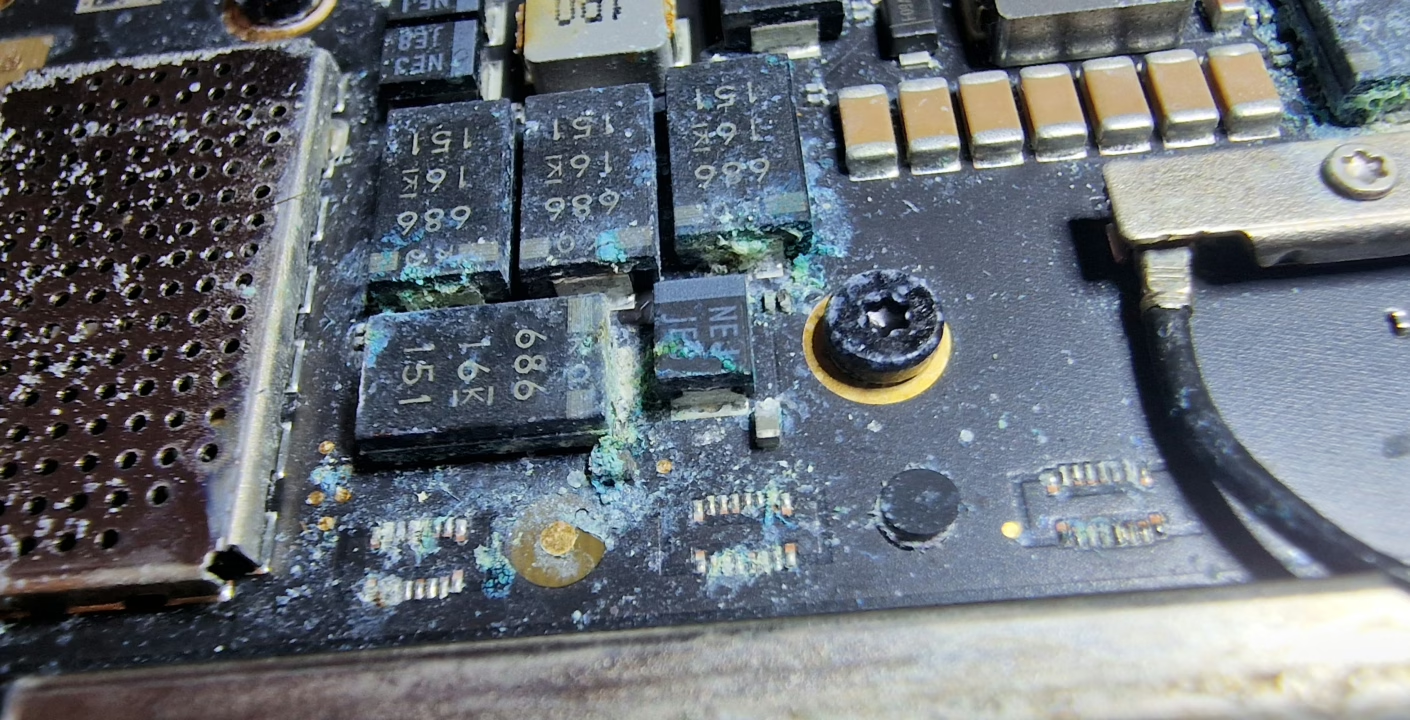
In the photos below, you can see exactly what that corrosion looks like. It starts small, but over time it spreads like rust, gradually destroying the board’s circuitry. The longer it’s left untreated, the worse it gets.
This particular MacBook was brought in to me for what the customer thought was a simple screen replacement. The liquid spill had happened weeks earlier, and since the laptop was still turning on, they didn’t think much of it. But once I opened it up, the reality was clear — the logic board was heavily corroded, far beyond repair.
It was honestly a miracle that it still powered on at all.


Early Cleaning Can Save Your Mac (and Your Wallet)
If this MacBook had been brought in right after the spill, the situation would’ve been very different. A professional clean of the logic board — using ultrasonic cleaning and the right electronic-safe solvents — would have removed the liquid and corrosion before it spread.
That kind of early intervention usually costs a fraction of what a major repair or replacement does, and in many cases, the device can go on to work perfectly for years.
By waiting, however, the corrosion had time to eat through the board’s components, damaging vital circuits and chips beyond recovery. Sadly, what could have been a quick, affordable clean turned into a complete replacement job — meaning the customer had to buy a new MacBook.
Why “It Still Works” Doesn’t Mean “It’s Fine”
Just because your MacBook still turns on after a spill doesn’t mean the liquid hasn’t done damage. In fact, the worst corrosion often happens slowly over time, underneath chips and components where you can’t see it.
That’s why it’s so important to:
Unplug the charger and turn the device off immediately.
Do not try to dry it with heat (like a hairdryer) — this can make it worse.
Bring it in for professional inspection and cleaning as soon as possible.
Even if everything appears normal, getting it properly cleaned can prevent long-term failure and save you hundreds of pounds in the future.
The Bottom Line
Liquid damage is time-sensitive. The faster it’s dealt with, the higher your chances of a full recovery — and the lower your repair costs.
So if you’ve spilled coffee, water, juice, or any liquid on your MacBook or laptop, don’t wait to see if it “still works.” Bring it in for a proper clean and inspection right away. You might just save your device — and your bank account — from serious damage.
Serving Birmingham and the surrounding areas, I specialise in MacBook liquid damage repair, logic board cleaning, and component-level restoration.
If you’ve had a spill, get in touch today — a quick clean now could save your Mac tomorrow.
